I Talk About Business Continuity. Then My Own Website Went Down.
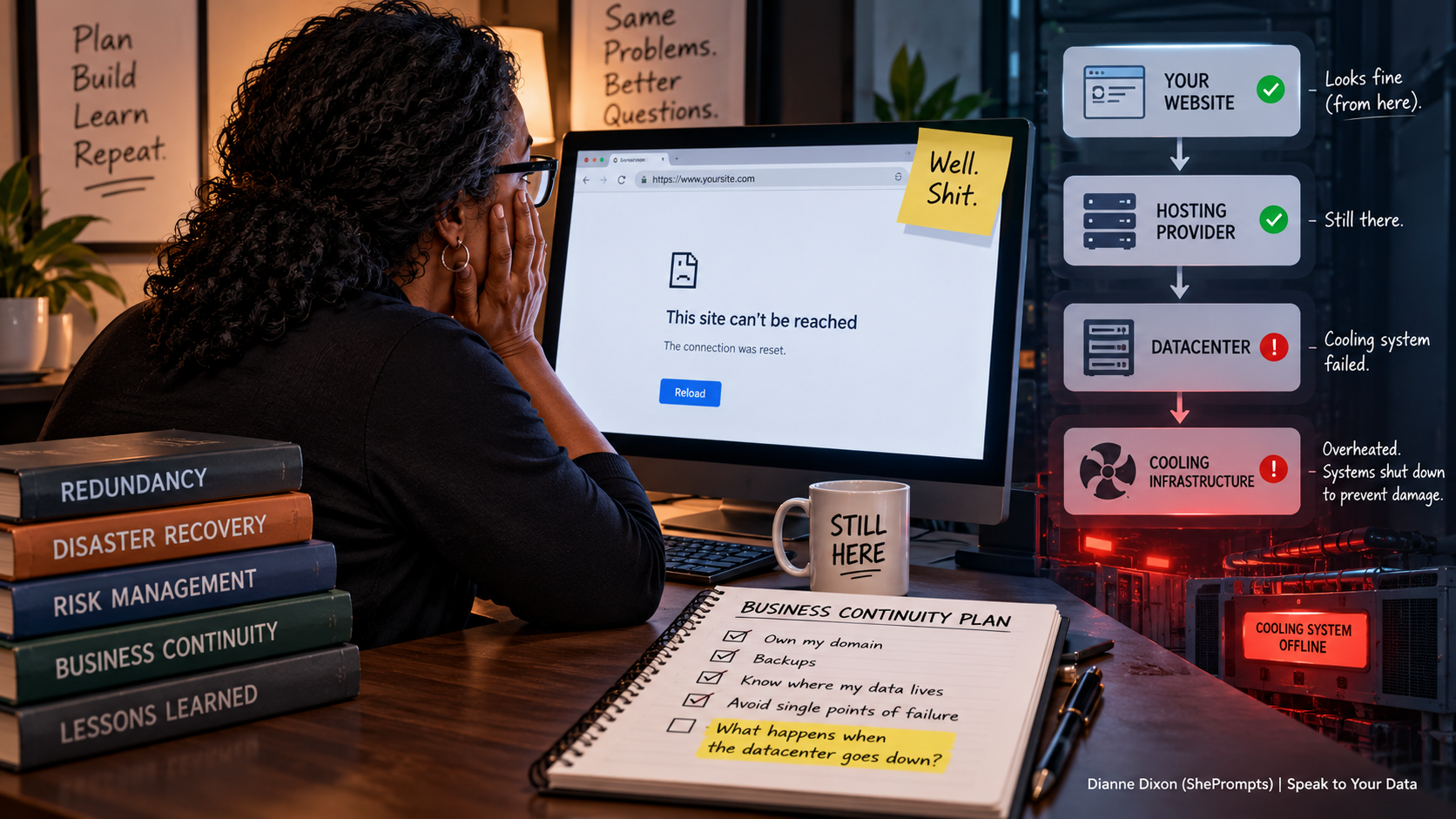
There is something slightly humbling when you’re talking about business continuity, redundancy, and site ownership while staring at the blank page that used to be your site’s home page.
The only thing you can say is: "Well. Shit. That’s happening."
That was me during the week of August 10, 2026—my birthday week.
I went to my site to find an article URL and it was unreachable. My mind immediately raced: What’s going on? Oh my god, did I lose my domain? Because that would be stupid of me…
Nope. I checked my hosting provider and saw they were also experiencing issues, accompanied by a status update regarding their Phoenix datacenter: The cooling systems had failed, and servers were being shut down to prevent permanent hardware damage.
And just like that, my website—along with many others—was unavailable.
- Not hacked.
- Not deleted.
- Not broken because I did something stupid.
Unavailable simply because something several layers below my website and beyond my control had failed. That distinction turned out to be far more important than I initially realized.
The Limits of Redundancy
I talk a lot about redundancy. I believe businesses should own their domains, maintain offsite backups, understand where their data lives, and avoid putting everything they care about behind a single point of failure.
I still believe all of that. But this experience served as a practical reminder: redundancy doesn't mean nothing will ever go wrong.
It means that when something goes wrong, you've hopefully limited how much damage that failure can do. My files were still safe, my domain was still mine, and my website hadn't evaporated into thin air. The hosting infrastructure was experiencing a major failure, and the only sensible action was to wait it out. It took about 36 hours for everything to get back online.
That's when I learned another critical rule:
Rule #1 in an outage: Don't panic-migrate.
My first instinct wasn't necessarily to abandon my hosting provider, but I completely understand why someone would react that way. Their site is down through no fault of their own. It’s the host’s fault, so the logical move seems to be finding another host immediately. Problem solved—right?
Except... not necessarily.
For one thing, I have been with my hosting provider for years. One serious infrastructure failure isn't enough data to declare an entire company unreliable. More importantly, when the provider itself is experiencing an infrastructure emergency, the administrative systems you need to manage your account or initiate a migration are usually affected too. You can’t move anything during the storm anyway.
There are also environmental realities out of anyone’s control. Arizona experiences extreme heat, and cooling hardware can suddenly fail. There’s a massive difference between making a deliberate decision to move providers and trying to migrate an entire business in the middle of a crisis.
Asking Better Questions
I waited. And while I waited, I started asking better diagnostic questions:
• What redundancy do I already have in place?
• Where are my actual single points of failure?
• What happens if DNS goes down vs. the web host going down?
• What happens if an entire datacenter goes offline?
• What can I control, and what can't I control?
And perhaps most importantly: What should I be doing differently for my clients?
That last question transformed this from a frustrating website outage into actionable field research. I decided to move my authoritative DNS to Cloudflare while keeping my existing registrar and hosting arrangement. That added an extra layer of DNS redundancy without requiring me to abandon a hosting provider I'm otherwise satisfied with.
However, it also highlighted a critical technical truth: DNS redundancy is not hosting redundancy. If my hosting provider's entire datacenter disappears, Cloudflare can still answer the DNS request—it just can't manufacture a copy of my website out of thin air.
So there is another question I need to ask my hosting provider: What is your plan for geographic hosting redundancy if an entire datacenter becomes unavailable?
The Outage Diagnosis SOP
When a site drops, "fix the website" cannot be Step 1. First, diagnose the failure layer:
- Is the core application/code broken?
- Is the hosting provider suffering a datacenter outage?
- Is authoritative DNS responding?
- Is domain registration active and unexpired?
- Are offsite backups verified and intact?
- Are file systems still accessible via remote protocols?
Building for Failure
I'm incorporating that diagnostic checklist into my maintenance SOP going forward. We often miss this perspective when discussing business resilience: we talk about backups, redundancy, disaster recovery, and infrastructure ownership—and all of those things matter.
But sometimes the disaster isn't something you caused.
Sometimes a cooling system fails in a datacenter. Sometimes a provider suffers an infrastructure failure. Sometimes the thing you carefully built goes offline anyway.
That's not a failure of your planning. It's a reminder that planning has natural limits. The goal isn't to build a system that can never fail—that's impossible. The goal is to build a system that can fail without taking everything else down with it.
You make the plan. Reality punches a hole in it. You figure out where the hole is. Then you build better.
That's the Workshop.